Something remarkable happened to ChatGPT between 2024 and 2026. It stopped feeling like a novelty and started feeling like infrastructure. Millions of Americans now open it the same way they open email automatically, daily, without thinking twice. That shift didn’t happen by accident. The ChatGPT new features rolling out through 2026 are the most consequential updates OpenAI has ever shipped. They touch everything from how the tool thinks, to how it speaks, to how much it costs.
This isn’t another surface-level roundup. Whether you’re a solo freelancer in Austin, a marketing director in Chicago, or an IT manager deciding on ChatGPT for business teams, this article gives you the full picture. You’ll learn exactly what changed, what it means for your workflow, and which plan actually makes sense for your situation. Let’s get into it.
1. ChatGPT New Features 2026: GPT-5 and the Models Now Powering the Platform
The engine driving every ChatGPT new feature in 2026 is GPT-5 and it’s a meaningful leap forward. Earlier versions were impressive but inconsistent. GPT-5 handles long-form content, complex multi-step reasoning, and nuanced instruction-following with far greater precision. It doesn’t just generate text. It understands context across long conversations, remembers earlier instructions within a session, and produces outputs that require far less human correction. For professionals, content creators, and research teams across the USA, this changes what’s actually possible in a single working session.
What makes GPT-5 particularly valuable is model switching, a feature now available across most paid plans. You’re no longer locked into one model for every task. Use a faster, lighter model for quick drafting or brainstorming. Switch to the advanced model when you need deep AI-powered research or complex analysis. This flexibility is what separates ChatGPT 2026 from its predecessors. It’s no longer a one-size-fits-all tool. It’s a configurable AI assistant for work that adapts to the task in front of you.
OpenAI’s latest model releases , and which version is right for you
Choosing the right model doesn’t need to be complicated. Here’s a straightforward breakdown of what’s available and who each version suits best:
| Model Type | Speed | Best For | Plan Required |
| Fast Model | Very Fast | Drafting, summarising, brainstorming | Free, Go, Plus |
| Standard Model | Moderate | Everyday writing, research, emails | Go, Plus |
| Advanced Model (GPT-5) | Measured | Deep analysis, legal research, long-form content | Plus, Business, Enterprise |
| Custom/Fine-tuned | Varies | Enterprise-specific workflows | Enterprise only |
A freelance copywriter in New York doesn’t need GPT-5 for every task. A faster model handles routine drafting and summarising without burning through usage limits. However, a legal researcher building case arguments or a data analyst interpreting complex reports absolutely benefits from the advanced model’s deeper reasoning. The AI model access you get directly depends on your plan and that’s why the pricing conversation matters so much.
2. ChatGPT Pricing in 2026: Free, Go, Plus, Business & Enterprise Explained
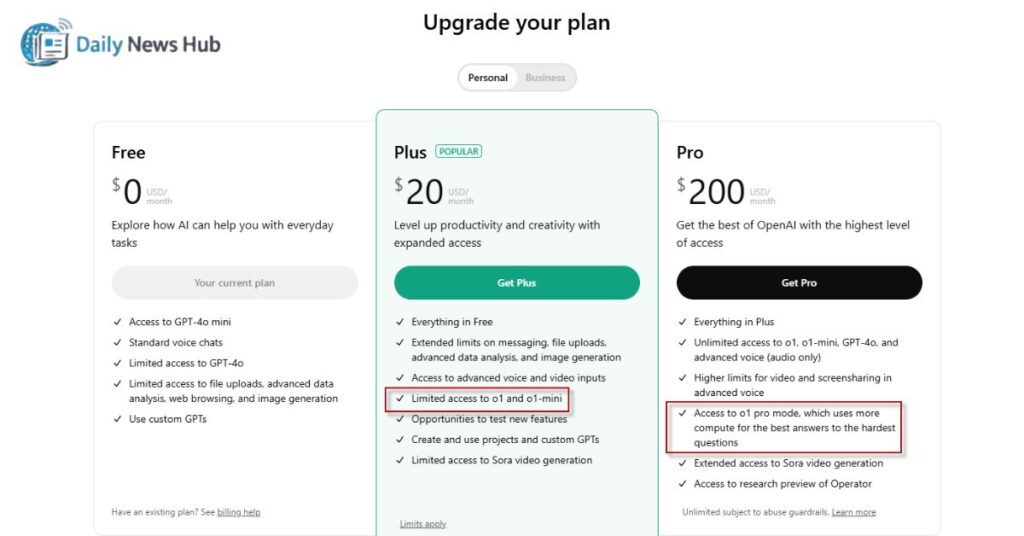
ChatGPT pricing in 2026 is more structured than ever before and that’s genuinely good news for US users. OpenAI has filled in the gaps between the free tier and the full professional suite. The result is a five-tier system that actually matches how people use the tool in real life. ChatGPT Free still exists and still works. ChatGPT Go sits in the middle as a new, affordable option for regular users. ChatGPT Plus remains the most popular individual plan. ChatGPT Business serves small-to-mid-size teams. ChatGPT Enterprise handles large-scale deployment with full security and compliance features.
Understanding ChatGPT plans is less about the price tag and more about usage frequency. If you open ChatGPT twice a week to summarize an article, the free plan handles that fine. If you use it every single workday for client deliverables, research, or content production, you’ll hit the free plan’s ceiling within the first week of the month. The plan comparison really comes down to one honest question: how central is this tool to your income or your team’s output?
Not every plan upgrade is worth it. Here’s how to choose without overpaying.
Here’s a direct, no-fluff decision guide for US users trying to figure out the best ChatGPT plan for individuals 2026:
| Plan | Monthly Cost (Est.) | Message Limits | Key Features | Best For |
| ChatGPT Free | $0 | Low | Basic models, limited features | Occasional users |
| ChatGPT Go | Low-mid tier | Higher | More capacity, fewer interruptions | Regular daily users |
| ChatGPT Plus | ~$20/month | High | GPT-5 access, faster performance | Professionals, creators |
| ChatGPT Business | Per seat | Very High | Admin controls, shared workspace | Teams of 2–50 |
| ChatGPT Enterprise | Custom | Unlimited | Security, compliance, integrations | Large organizations |
The upgrade path most US professionals follow looks like this: start free, hit the limits within two weeks, move to Go or Plus, and never look back. The jump from ChatGPT Free to ChatGPT Go is the most underrated move in 2026. It unlocks significantly higher usage limits without the full commitment of a Plus subscription. For solopreneurs, students, and part-time creators, Go hits the sweet spot perfectly.
3. One of ChatGPT’s New Features: Native Integration with Excel and Google Sheets
Nobody saw this coming as clearly as they should have. One of the most practical ChatGPT new features in 2026 is the native integration with Microsoft Excel and Google Sheets. This isn’t a clunky third-party plugin. It’s a direct, in-platform connection that lets you use ChatGPT as an AI assistant for work right inside your spreadsheet environment. You can ask it to write complex formulas, clean messy datasets, flag duplicate entries, summarize rows of data, or generate trend narratives from raw numbers — all without leaving your spreadsheet.
For US business users, this is enormous. Think about a small business owner in Phoenix managing inventory across 400 product lines. Or a financial analyst in Boston preparing quarterly reports from raw CSV exports. ChatGPT for business now plugs directly into the tools these professionals already use every day. It removes the friction of copy-pasting data into a chat window. The AI productivity tool becomes embedded into the actual workflow rather than sitting alongside it as a separate step.
How to connect ChatGPT with Google Sheets (Quick Steps):
- Open Google Sheets and navigate to Extensions
- Search for the official ChatGPT or OpenAI add-on
- Connect using your OpenAI account credentials
- Use the GPT() function directly in cells
- Input your prompt as the function argument and let it run
This integration particularly benefits individuals, professionals, field teams, and enterprises who live inside spreadsheets. It’s one of the ChatGPT practical use cases 2026 that delivers immediate, measurable time savings on day one.
4. Prism, Voice & Memory , The ChatGPT New Features That Are Actually Useful
Prism is the standout addition most tech coverage hasn’t given enough attention. It’s a dedicated AI workspace built for structured writing, research collaboration, and long-form drafting. If you’ve ever found yourself constantly switching between a chat window, a Google Doc, a reference tab, and a notes app Prism eliminates that chaos. It brings everything into one environment. Writers can draft, reference sources, iterate on sections, and collaborate with teammates without ever leaving the workspace. It’s a genuine structured writing tool built for serious long-form content production.
Voice mode in 2026 is a completely different animal from the stilted, robotic voice interaction of earlier years. ChatGPT voice mode 2026 delivers real-time AI responses that feel genuinely conversational. You speak naturally. It responds naturally. The back-and-forth doesn’t feel like talking to a machine it feels like thinking out loud with a knowledgeable colleague. For field teams conducting site assessments, sales professionals on discovery calls, or anyone who does their best thinking while pacing around the room, this feature has become indispensable.
Three updates that quietly changed how people use ChatGPT every day.
The AI memory feature is the third update that deserves serious attention and it’s the one most users underestimate. Memory allows ChatGPT to retain context between separate conversations. It remembers your writing style, your recurring projects, your preferred tone, and your common workflows. Instead of re-explaining your context every single session, the tool already knows who you are and how you work. The ChatGPT memory feature explained simply: it’s like having an assistant who actually remembers what you told them last Tuesday.
| Memory Feature | What It Stores | What It Doesn’t Store | How to Clear |
| Writing Style | Your tone, voice, formatting preferences | Passwords, financial data | Settings → Memory → Clear |
| Project Context | Recurring topics, client names, goals | Private documents | Individual memory deletion |
| Preferences | Output length, language style | Sensitive personal data | Full memory reset option |
However, sensitive data and AI is a real consideration for US enterprises and regulated industries. The AI governance question around Memory isn’t hypothetical; it’s something legal teams, HR departments, and compliance officers are actively discussing. The rule is simple: treat ChatGPT’s Memory like a shared notebook, not a secure vault. Keep proprietary data, client PII, and confidential business information out of it entirely.
5. Is the Free Version Worth It After All the ChatGPT New Features in 2026?
Here’s the honest truth about ChatGPT free plan limitations 2026: the free tier is still genuinely useful for a surprising range of tasks. ChatGPT Free handles everyday drafting, quick summarising, casual brainstorming, and general problem-solving without breaking a sweat. For a college student writing a paper outline, a small business owner drafting a quick email, or someone just exploring what conversational AI can do, the free plan delivers real value. It’s not a bait-and-switch placeholder. It’s a functional product.
That said, the ceiling hits fast once you start relying on it for real work. During peak usage hours which for US users typically means late morning to mid-afternoon Eastern time the free plan slows noticeably. Message caps interrupt momentum at the worst possible moments. Access to AI model access for advanced reasoning tasks gets restricted. The ChatGPT free vs plus comparison isn’t even close once you hit those limits. Free is a great starting point. It’s a poor long-term solution for anyone building a workflow around AI-powered research or daily professional output.
The honest answer and when it makes sense to upgrade.
The upgrade decision comes down to three clear trigger points. First, if you’re opening ChatGPT every single workday and relying on it for deliverables that directly affect your income, free is already costing you more in frustration than the subscription costs in dollars. Second, if you need GPT-5 access for complex research, analysis, or technical writing, the free plan simply won’t get you there. Third, if you’re part of a team where multiple people need consistent, reliable AI chatbot 2026 performance, ChatGPT Business becomes the logical next step.
Quick Upgrade Checklist , Should You Move Up?
| Situation | Recommended Plan |
| Use ChatGPT 1–2 times per week | Stay on Free |
| Use it daily but solo | ChatGPT Go or Plus |
| Rely on it for income-generating work | ChatGPT Plus |
| Small team needing shared access | ChatGPT Business |
| Large org with compliance requirements | ChatGPT Enterprise |
6. The Microsoft-OpenAI Fallout: What It Means for ChatGPT’s New Features and Future
The relationship between Microsoft and OpenAI built the modern AI industry as we know it. Microsoft’s multi-billion dollar investment gave OpenAI the computer infrastructure to train GPT-4 and GPT-5. In return, Microsoft embedded OpenAI ChatGPT technology into Bing, Azure, Copilot, and Office 365. For a while, this looked like the most consequential tech partnership since the iPhone era. However, cracks have emerged in 2026 that signal a fundamental shift in how both companies see their future. The AI industry news cycle has been dominated by reports of strategic disagreements, competing product visions, and OpenAI’s deliberate push toward independence.
For US enterprises running Azure-integrated workflows that rely on OpenAI’s API, this matters more than it might appear. If OpenAI deepens its independence and reduces its reliance on Microsoft’s cloud infrastructure, pricing structures, deployment pathways, and support agreements could all shift. ChatGPT for business teams that currently access the tool through Microsoft’s ecosystem need to monitor this situation closely. It won’t disrupt existing contracts overnight but the OpenAI future roadmap looks increasingly divergent from Microsoft’s enterprise AI ambitions.
The partnership that built the AI boom is showing serious cracks.
To understand why this matters, consider the timeline. Microsoft invested $1 billion in OpenAI in 2019. A $10 billion follow-on came in 2023. The partnership gave OpenAI legitimacy, infrastructure, and distribution at a scale no startup could build alone. However, OpenAI’s explosive commercial success driven largely by ChatGPT updates and direct consumer subscriptions reduced its dependence on Microsoft’s backing. OpenAI now generates substantial independent revenue. That changes the power dynamic entirely.
“The companies that build the infrastructure of a new era rarely stay aligned with the companies that benefit from it.” ,
A pattern repeated across every major technology transition.
For everyday ChatGPT users in the USA, the near-term impact is minimal. The product continues to improve. ChatGPT new features keep shipping. However, for AI adoption decisions at the organizational level, the OpenAI-Microsoft situation is worth factoring into long-term planning. Diversifying your AI tools for structured writing and research across more than one provider is simply good operational hygiene right now.
7. Can ChatGPT’s New Features Handle Real Work? Writing, Research, and Legal Use Cases

The answer in 2026 is a qualified but firm yes with important caveats depending on the use case. For content creators, professionals, and AI writing tool users, ChatGPT now handles the full arc of a content project. It researches, outlines, drafts, edits, reformats, and repurposes content across formats. A Texas-based marketing agency reported cutting their first-draft production time by nearly 60% after integrating ChatGPT Plus into their content workflow. The tool doesn’t replace the writer’s judgment or creative voice but it eliminates the blank-page problem permanently.
AI-powered research is where ChatGPT 2026 makes its most meaningful professional contribution. Research teams at mid-size US companies now use it to synthesize literature, compare regulatory frameworks, and generate briefing documents in a fraction of the time those tasks previously required. The legal use case is where caution matters most. ChatGPT can help self-represented individuals understand legal concepts, organize arguments, and research precedents , but AI usage guidelines in the legal profession are clear: AI outputs are a starting point, never a final authority. Always verify everything with a licensed attorney before relying on it in any legal proceeding.
Real-World Case Study , Freelance Content Creator, Nashville TN: A freelance writer producing 8–10 long-form articles per month integrated ChatGPT Plus into her workflow in early 2026. She uses it for initial research, structural brainstorming, and first-draft drafting. Human editing, fact-checking, and voice refinement remain entirely hers. Result: output doubled, client satisfaction held steady, and hourly earnings increased by 40%.
8. Risks You Should Know Before Going All-In on ChatGPT’s New Features
Over-reliance on AI is the risk nobody talks about until it bites them. Teams that stop verifying AI outputs because “ChatGPT is usually right” eventually encounter the exceptions — and those exceptions can be costly. Outdated AI information is a persistent issue even in 2026. The model’s training data has a cutoff point. Events, regulations, market conditions, and scientific findings that post-date that cutoff may be missing, incomplete, or confidently incorrect. Every output that informs a real decision needs a human verification step. Full stop.
AI bias in responses is another genuine risk, particularly for US businesses serving diverse customer bases. The model reflects patterns in its training data , and those patterns aren’t perfectly neutral. Content generated for marketing campaigns, HR communications, or customer-facing materials should always pass through a human review that specifically checks for unintended bias. Sensitive data and AI is the third risk that demands a clear AI governance policy before any serious organizational deployment. Employees sharing proprietary customer data, financial projections, or confidential business strategies with ChatGPT’s Memory enabled creates data exposure risks that legal and compliance teams take very seriously.
5 Rules for Safe ChatGPT Use at Work:
- Always verify factual claims before using them in client-facing or legal documents
- Never input personally identifiable customer information into any ChatGPT interface
- Establish clear usage guidelines before team-wide AI adoption
- Review and clear Memory settings regularly , especially when changing projects
- Treat AI-generated content as a first draft, not a final product
9. What’s the Right Upgrade Path to Access All ChatGPT New Features?
Smart AI adoption doesn’t start at the top and work down. It starts at the bottom and scales based on evidence. For most US individuals and teams, the right first move is to spend two to four weeks on ChatGPT Free or ChatGPT Go running real workflow tasks not demo prompts. Track where you hit limits. Note which tasks feel painfully slow. Document where the tool genuinely saves time versus where it creates more work through corrections. That data tells you exactly which plan to move to next. The upgrade path should be driven by real usage patterns, not feature lists on a pricing page.
Once the evidence points toward an upgrade, the how to upgrade ChatGPT plan process is straightforward through OpenAI’s website. For enterprises evaluating ChatGPT Enterprise, the procurement process involves direct contact with OpenAI’s sales team, compliance review, and custom contract negotiation. ChatGPT enterprise features including SSO, audit logs, dedicated support, and custom deployment make this the only viable option for large US organizations in regulated industries like healthcare, finance, and legal services. AI governance frameworks should be established before enterprise rollout, not after.
Upgrade Path Flowchart:
Occasional User → ChatGPT Free
↓
Daily Personal Use → ChatGPT Go
↓
Professional Daily Use → ChatGPT Plus
↓
Small Team (2-20 people) → ChatGPT Business
↓
Large Organization / Regulated Industry → ChatGPT Enterprise
10. Bottom Line: Do ChatGPT’s New Features Make It Still the AI to Beat in 2026?
After everything the new models, the pricing restructure, Prism, Voice mode, Memory, the spreadsheet integrations, and the geopolitical drama between Microsoft and OpenAI the honest verdict is yes. ChatGPT new features in 2026 represent the most cohesive, practically useful version of the product since its launch. It’s more affordable to scale with ChatGPT Go filling the mid-tier gap. It’s more capable with GPT-5 powering advanced reasoning. It’s more integrated with Excel and Sheets handling real workflow tasks. And it’s more context-aware with Memory reducing the repetitive setup tax of previous versions.
For anyone who paused ChatGPT adoption in 2023 or 2024 because it felt too experimental, too expensive, or too disconnected from real workflows 2026 is the year to revisit that decision. The AI chatbot 2026 landscape is crowded with capable alternatives, but none of them offer the same combination of model quality, workflow integration, pricing flexibility, and mainstream adoption that OpenAI ChatGPT commands. The smart move isn’t to pick the best AI tool and ignore everything else. It’s to build a structured, governed approach around the tool that fits your workflow and right now, for most US users, that tool is ChatGPT.
FAQs
What are the most important ChatGPT new features in 2026?
The most impactful ChatGPT new features in 2026 are GPT-5 model access, the Prism workspace for structured writing, enhanced Voice mode with real-time AI responses, expanded AI memory feature for personalized sessions, and native integration with Excel and Google Sheets. Together, these updates make ChatGPT genuinely useful for professional, daily workflows rather than occasional experimentation. Each feature addresses a specific friction point that previously limited the tool’s real-world utility.
Does ChatGPT still offer a free plan with access to new features?
Yes ,ChatGPT Free still exists and still provides access to core capabilities including drafting, summarising, and basic brainstorming. However, ChatGPT free plan limitations 2026 include message caps, restricted access to advanced models like GPT-5, reduced performance during peak hours, and limited access to newer features like Prism and full memory functionality. For occasional users, Free remains a solid option. For anyone relying on the tool professionally, the limitations surface quickly.
Is ChatGPT Plus worth it for the new features?
For daily professional users, is ChatGPT Plus worth it 2026 has a clear answer: yes. ChatGPT Plus provides full GPT-5 access, significantly higher usage limits, faster response times, and access to all major ChatGPT new features including Prism, advanced Voice mode, and full Memory. The ChatGPT free vs plus comparison isn’t close for professionals who use the tool as a core part of their income-generating work. At approximately $20 per month, it costs less than most single SaaS subscriptions while delivering far broader functionality.
What is ChatGPT Go and what new features does it include?
What is ChatGPT Go plan? It’s the most underrated addition to ChatGPT pricing in 2026. Positioned between ChatGPT Free and ChatGPT Plus, Go gives regular users meaningfully higher message limits and fewer usage interruptions without the full cost of a Plus subscription. It’s ideal for people who use ChatGPT daily for personal productivity but don’t yet need the full suite of professional features. Think students, part-time freelancers, and everyday AI productivity tool users who’ve outgrown Free but aren’t ready for Plus.
What is Prism? Is it one of the major ChatGPT new features?
What is Prism in ChatGPT ,it’s a dedicated AI workspace designed specifically for structured writing, collaborative writing, and long-form content production. Instead of managing a writing project across multiple tabs and apps, Prism consolidates drafting, referencing, and iteration into a single environment. It’s particularly valuable for research teams, technical writers, and content creators working on extended projects. Prism is genuinely one of the most significant ChatGPT new features in 2026 because it shifts the tool from reactive chat assistant to proactive writing partner.
What are the main limitations of the free plan’s new features?
ChatGPT free plan limitations 2026 center on four main constraints. First, message caps interrupt workflows at unpredictable intervals. Second, advanced AI model access including GPT-5 is restricted or unavailable on the free tier. Third, newer features like full Prism workspace access and complete Memory functionality require paid plans. Fourth, performance degrades noticeably during peak US usage hours. These limitations don’t make ChatGPT Free useless, they make it unsuitable for anyone building serious professional workflows around the tool.
Which AI tools are worth trying alongside ChatGPT in 2026?
The AI chatbot 2026 landscape offers strong complementary options. Perplexity AI excels at real-time web research with cited sources, a strong companion for fact-checking ChatGPT outputs. Claude by Anthropic handles long-document analysis and nuanced writing tasks with impressive depth. Google Gemini integrates tightly with Google Workspace for US users already embedded in that ecosystem. None of these replace OpenAI ChatGPT as a primary AI assistant for work but using one or two alongside it creates a more resilient, versatile AI productivity tool stack for serious professionals.

Marvi Channa is the author at DailyNewsHub.site, sharing breaking news, tech updates, sports highlights, and trending global stories with clarity and credibility. She’s passionate about timely reporting and keeping readers informed fast